How Payroll Teams Can Use n8n Without Enterprise Budgets
How small payroll teams can use n8n to automate the recurring coordination work around payroll - reminders, approvals, exceptions and reconciliation - without enterprise budgets or large transformation programs.
Payroll teams often face a difficult automation problem.
They are expected to deliver accurate payroll, support finance, answer HR questions, document controls, chase missing input and keep processes moving every month.
But they are not always given enterprise-level automation budgets.
Many payroll teams do not have access to a large transformation program, a dedicated internal automation team or expensive enterprise workflow software.
That does not mean automation is impossible.
It just means payroll teams need to start differently.
Instead of trying to automate the payroll system itself, teams can use workflow automation tools like n8n to improve the recurring operational work around payroll.
Reminders. Status tracking. Approvals. Exception follow-up. Documentation. Reporting. Reconciliation support.
These are often the areas where payroll teams lose the most time - and they are also the best places to start.
What n8n Is - and Why Payroll Teams Should Care
n8n is a workflow automation tool that connects systems, data sources and actions. It can help teams build workflows such as:
For payroll teams, the value is not that n8n "does payroll".
It should not replace your payroll system.
The value is that n8n can support the operational layer around payroll. That means connecting the tools many teams already use:
- spreadsheets
- Microsoft Teams or Slack
- forms
- HR exports
- finance files
- ticketing systems
- shared folders
- databases
- approval trackers
This makes n8n especially interesting for payroll teams that need practical automation but do not have the budget or timeline for a large enterprise implementation.
The SalaryOps Principle: Automate Coordination Before Calculation
Payroll is high-risk work. That is why automation should be introduced carefully.
The safest starting point is usually not salary calculation, tax handling or direct payroll system updates. The safest starting point is the recurring coordination work around payroll.
At SalaryOps, we use a simple principle:
Automate coordination before calculation.
That means starting with workflows like:
- reminding HR or managers about missing payroll input
- tracking payroll approvals
- logging salary change documentation
- assigning owners to payroll exceptions
- collecting explanations for finance variances
- sending payroll close summaries
- documenting process steps and timestamps
These workflows can reduce friction without removing human review or bypassing controls.
Use Case 1: Missing Payroll Input Reminders
One of the simplest n8n workflows for payroll teams is a missing input reminder.
The problem is familiar: payroll cut-off is approaching, but some inputs are still missing.
Examples include:
- salary changes
- new hires
- terminations
- absences
- bonuses
- commissions
- variable pay
- cost center changes
Without automation, payroll teams manually check spreadsheets, send reminders and follow up one by one.
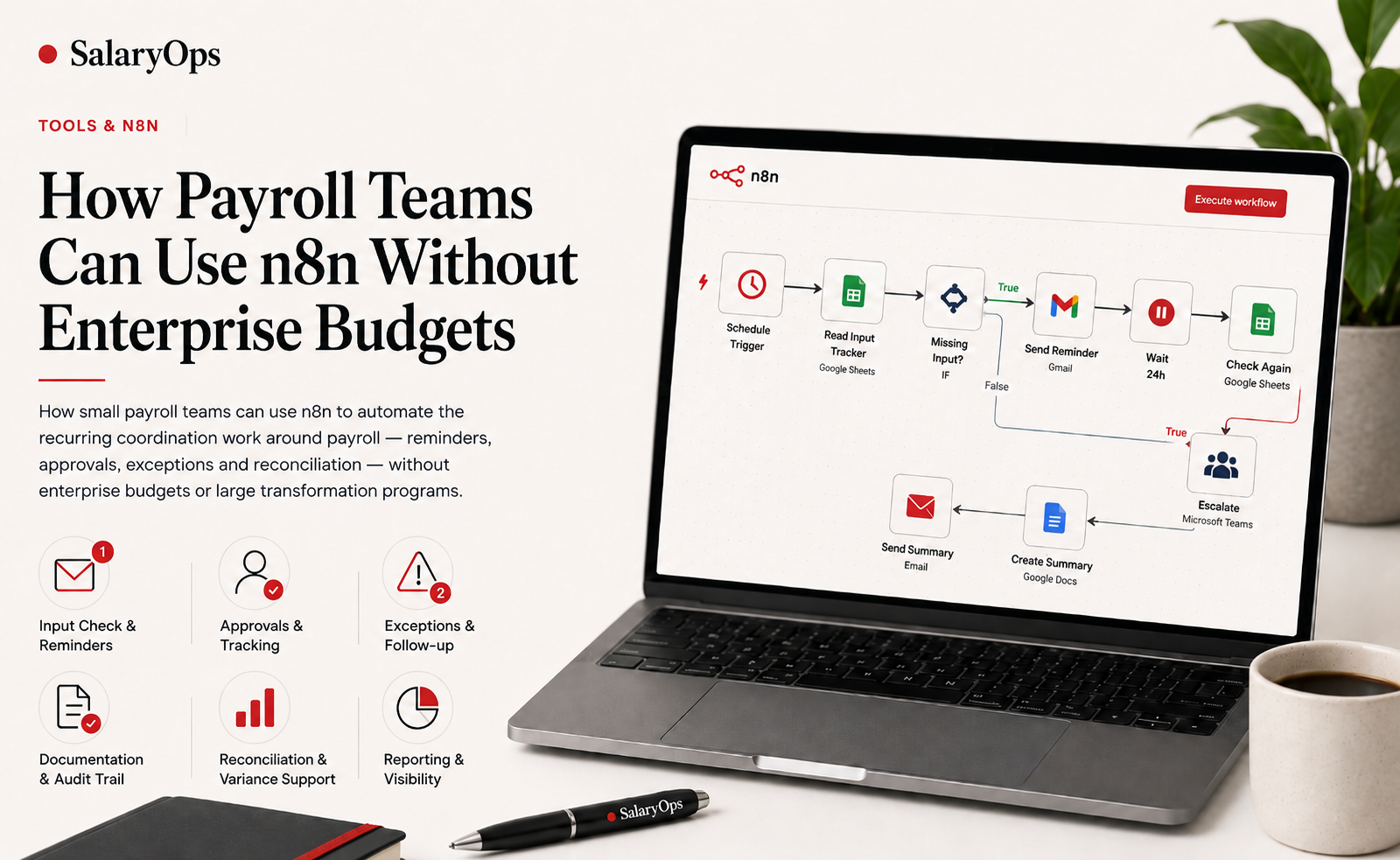
With n8n, the workflow can look like this:
This is a low-risk workflow because it does not change payroll data.
It only improves visibility, accountability and timing.
Use Case 2: Payroll Approval Tracking
Many payroll approval processes are still too informal. Approval may happen through email, chat or comments in a file.
The problem is not just getting approval. The problem is proving what was approved, by whom and when.
n8n can support a more structured approval workflow.
This helps payroll teams create a better approval trail without investing in a large enterprise workflow platform.
The key point is that n8n should not "approve payroll" automatically. It should coordinate the approval process and document the result.
Use Case 3: Payroll Exception Handling
Payroll exceptions are normal.
But if exceptions are handled across email threads and spreadsheets, they become difficult to control.
Common exceptions include:
- high salary variance
- missing approvals
- negative net pay
- missing cost center
- terminated employee included in payroll
- late changes after cut-off
- duplicate payment risks
- missing documentation
A simple n8n workflow can help turn exceptions into a structured process:
Again, the workflow does not need to fix the payroll data automatically.
It creates ownership, documentation and follow-up. That alone can significantly improve payroll control.
Use Case 4: Payroll-to-Finance Reconciliation Support
Finance often needs explanations for changes in payroll costs. For example:
- Why did salary costs increase this month?
- Why did this cost center change?
- What explains the bonus variance?
- Why did employer taxes or pension amounts move?
- Which headcount changes affected the numbers?
Without structure, these questions often arrive after payroll close and are answered manually.
n8n can help prepare reconciliation explanations earlier.
This does not replace finance review. It simply gives finance better input, earlier.
Why n8n Works Well for Payroll Operations
n8n is especially useful for payroll operations because many payroll pain points are workflow problems. They are not always payroll system problems.
A payroll team may already have a payroll system that calculates salaries correctly. But the team may still struggle with:
- collecting input on time
- knowing who owns missing items
- getting approvals documented
- following up on exceptions
- explaining variances to finance
- storing audit documentation
- sending monthly reports consistently
These are operational workflow problems.
And workflow automation can often help without touching the core payroll engine.
A Practical Starting Stack
A payroll team does not need a complex setup to test n8n. A simple starting stack could be:
That is enough to build early workflows for:
- reminders
- trackers
- approvals
- documentation
- summaries
- notifications
The first goal should not be a perfect enterprise architecture.
The first goal should be a safe pilot workflow that proves whether automation can reduce manual payroll admin.
What Payroll Teams Should Not Automate First
The biggest mistake is starting too close to the payroll calculation itself.
Payroll teams should be careful with workflows that:
- update payroll master data automatically
- change salary amounts
- approve payroll without human review
- process sensitive employee data without access controls
- make tax or legal decisions
- post finance entries automatically
- send detailed payroll data to broad audiences
These areas may be automated later in mature environments. But they require stronger controls, testing, governance and security.
For most teams, they are not the right place to start.
Start with visibility and coordination. Not calculation.
How to Choose Your First n8n Payroll Workflow
A good first workflow should be:
- repetitive
- deadline-driven
- currently manual
- easy to track
- low-risk
- useful every payroll cycle
- not dependent on complex payroll system integration
A strong first candidate is usually one of these:
- missing input reminders
- approval tracking
- exception follow-up
- payroll close checklist
- finance variance explanation requests
- report distribution logging
Ask a simple question:
What do we manually chase, check or explain every payroll cycle?
That is often where your first automation opportunity is hiding.
The Budget Advantage
Enterprise payroll automation projects often become expensive because they try to solve too much at once. They involve:
- system integrations
- vendor procurement
- implementation partners
- large workshops
- custom development
- long timelines
- change management programs
Sometimes that is necessary. But not for every workflow.
Many payroll operations improvements can start with small, practical automations that support the existing process.
That is where n8n can be valuable.
It allows teams to test workflows before committing to larger transformation projects.
A Simple 30-Day n8n Pilot for Payroll Teams
Here is a practical way to start.
Week 1: Map
Choose one recurring payroll pain point. Document:
- what triggers it
- who owns it
- what data is needed
- what deadline applies
- what happens if it is late
- what documentation is required
Week 2: Design
Create a simple workflow design:
Week 3: Build
Build a simple n8n workflow using dummy data or a limited real process. Keep the first version small.
Do not connect directly to sensitive payroll systems unless proper security, testing and governance are in place.
Week 4: Pilot
Run the workflow in parallel with the existing process. Measure:
- time saved
- fewer manual reminders
- faster responses
- clearer ownership
- better documentation
- fewer unresolved items at cut-off
The goal is not perfection. The goal is proof.
The SalaryOps View
Payroll teams do not need to wait for a full enterprise transformation program before improving operations. They can start by automating the recurring work around payroll.
The reminders. The trackers. The approvals. The exceptions. The documentation. The reconciliation support.
n8n is not the payroll system.
It is a workflow layer that can help connect the operational pieces around payroll.
And for many teams, that is exactly where the first automation value is.
Structure your payroll process in 8 days.
A free 8-day email series for payroll specialists, managers and HR/finance teams. Practical examples on structure, controls and automation — no technical experience required.
- · one short email per day for 8 days
- · payroll workflow examples
- · control principles
- · n8n as part of the setup
- · free — unsubscribe anytime