
Can Payroll Reconciliation Be Automated? Moving from Excel Matching to Exception-Based Review
This article explores automating payroll reconciliation, moving from tedious Excel matching to efficient exception-based reviews. It highlights what can be automated and where human judgment remains critical for control and audit readiness.
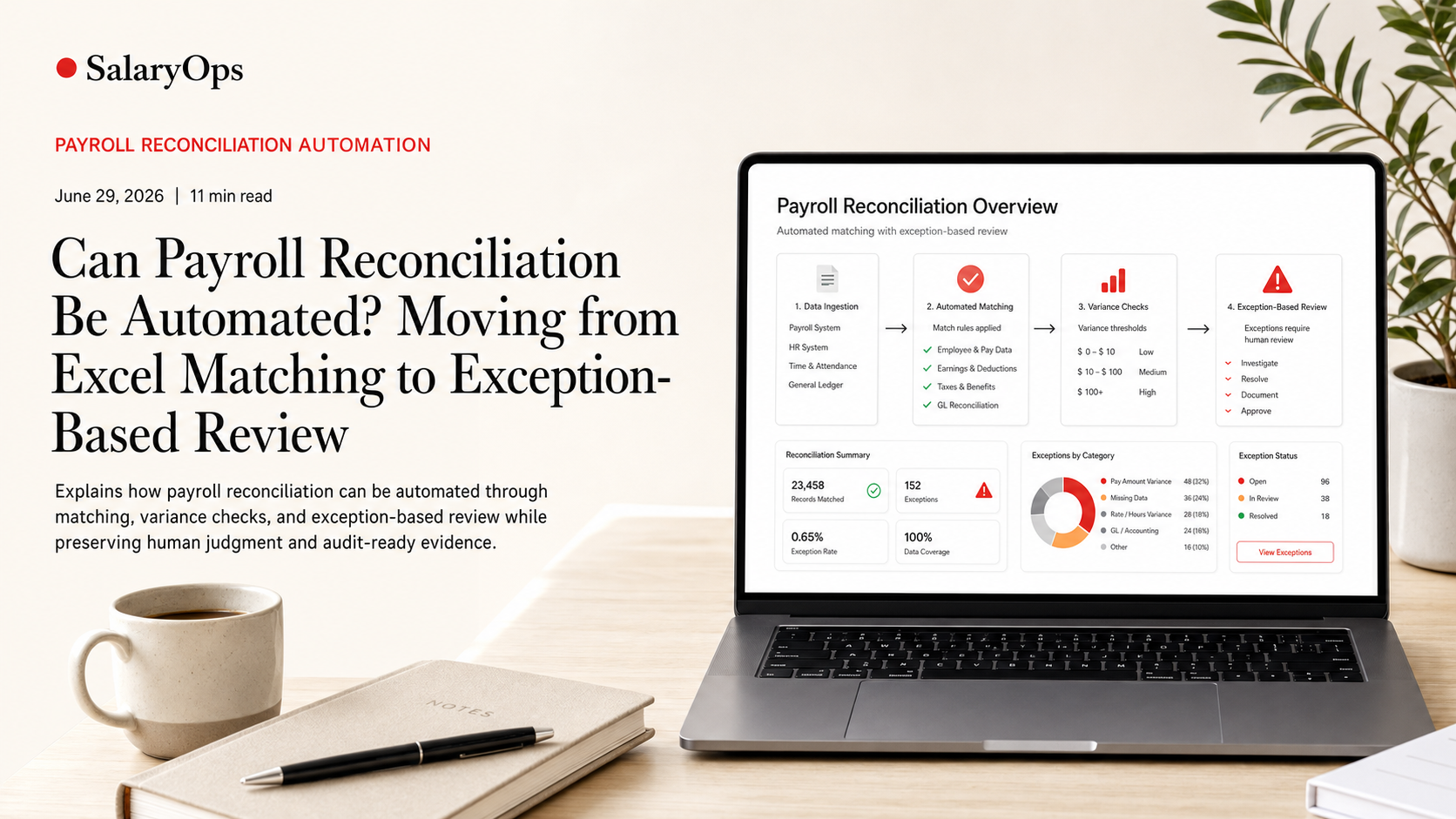
Can Payroll Reconciliation Be Automated? Moving from Excel Matching to Exception-Based Review
Payroll reconciliation can be automated-mostly. The useful goal is not "touchless payroll" (that promise usually ends badly), but a workflow where the system matches what should match, explains what doesn't, and leaves payroll professionals with a short, high-quality exception list to review.
That shift is happening for a reason. Across payroll platforms and operations literature in 2024-2025, the trend is moving away from periodic, end-of-cycle checking toward more continuous validation, better integrations, and anomaly detection that flags issues earlier in the pay process. Analysts also point to growing demand for flexible, AI-enabled payroll platforms that can handle modern workforce complexity without sacrificing control. At the same time, audit readiness is increasingly framed as a product feature: traceable calculations, approvals, and evidence packs that can be produced without assembling screenshots and spreadsheets.
This article breaks down what payroll reconciliation automation actually means in practice, what you can (and should) automate, where manual review remains essential, and how to get from Excel-based matching to exception-based review without creating faster chaos.
What "payroll reconciliation" really includes (and why Excel turns into a trap)
Most teams say "reconciliation" and mean one painful activity: comparing payroll output to last period and hunting for differences. In reality, reconciliation is a chain of checks across multiple systems and multiple "truths," typically including:
1) Input-to-payroll checks
- HR master data changes (hire, termination, FTE, salary, cost center)
- Time and attendance inputs (hours, overtime, absence, shift premiums)
- One-time payments (bonus, allowances, corrections)
2) Payroll calculation-to-policy checks
- Pay code and wage type logic
- Eligibility rules (union group, grade, location, contract)
- Country or local rules (tax, social security, caps, statutory leave)
3) Output-to-payment and output-to-accounting checks
- Net pay vs payment file / bank output
- Employer costs vs expected totals
- Payroll posting vs general ledger mapping (cost centers, projects, accounts)
Excel is not "bad." It's just the wrong system of record for repeatable controls. It depends on:
- People remembering which tabs matter
- Manual exports that change column order without warning
- Hidden formulas no one wants to touch
- Evidence that lives in email threads
If your control depends on memory, it is not a control.
Can reconciliation be automated? Yes-if you separate matching from judgment
The most practical way to think about automation is to split reconciliation into three layers:
Layer 1: Deterministic matching (highly automatable)
This is where automation shines. If two datasets should align based on defined keys and rules, the system can match them every time.
Examples:
- Matching employee IDs across HRIS, time system, payroll, and finance
- Matching pay codes/wage types to expected GL accounts
- Verifying that every time record imported to payroll is accounted for in the payroll result
- Checking that a payment file total equals the payroll net total (within an agreed tolerance)
Layer 2: Rule-based discrepancy detection (mostly automatable)
Once matching is in place, automation can calculate differences and evaluate them against rules.
Examples:
- Flag any employee with a net pay change above X% period-over-period
- Flag any overtime amount where overtime hours exist but the pay code is missing
- Flag negative earnings, negative taxes, or unusual reversals
- Flag changes to bank account details close to pay day
- Flag new pay codes appearing in output without an owner or mapping
Layer 3: Exception review and root cause learning (not fully automatable)
This is the part vendors sometimes try to "AI away." In real payroll operations, you still need human judgment for:
- Is the change correct, expected, and documented?
- Does the discrepancy reveal a broken integration, a mapping issue, or a policy edge case?
- What control should we add so this does not become a recurring surprise?
Automation is not replacing payroll expertise here. It is protecting it-by making review time predictable and focused.
What an exception-based reconciliation workflow looks like
An exception-based model is not just "a report." It is a controlled loop:
1) Define what "normal" looks like
- Baselines: last pay period, rolling 3 months, or policy-based expectations
- Tolerances: by employee group, country, pay type (salary vs hourly), and pay cycle
2) Run automated checks before the payroll run is finalized
Many teams only reconcile after payroll is calculated. A safer approach is to validate earlier:
- Validate HR changes before they reach payroll
- Validate time data before import
- Validate pay code mappings continuously
This aligns with the broader industry move toward more continuous validation rather than "one big close" at the end of the cycle.
3) Generate a ranked exception list
Not all exceptions are equal. A useful exception list:
- Prioritizes high-risk items (large amounts, sensitive master data, unusual reversals)
- Groups exceptions by root cause category (data, mapping, policy, integration)
- Shows "why it was flagged" in plain language
4) Review, resolve, and document
Resolution should produce three outputs:
- The fix (data correction, mapping update, policy clarification)
- The evidence (what changed, who approved, which rule was applied)
- The learning (new control, new rule, better validation upstream)
5) Preserve audit-ready evidence automatically
Audit readiness is where exception-based workflows pay back over time. Instead of manually building an evidence pack after the fact, the reconciliation process can capture:
- The control that ran (rule version and parameters)
- The dataset snapshots used
- The exceptions produced
- The reviewer decisions and approvals
- The final outcome
In 2025-era payroll guidance and vendor positioning, traceable calculations and formal approvals are increasingly treated as expected features-not nice-to-haves-because payroll teams are tired of proving work that was done correctly.
What you can automate first (without starting a "big transformation")
Payroll automation that works usually starts small, concrete, and repeatable. A good first automation target has three traits:
- It happens every pay cycle
- It is tedious and error-prone
- The logic can be defined clearly enough to test
Here are four high-value starting points for moving away from Excel matching:
1) Period-over-period variance checks at employee level
Automate a standard set of variance checks, for example:
- Net pay variance > 15%
- Gross pay variance > 10%
- Overtime pay present with zero overtime hours (or the reverse)
- Allowance changes without corresponding HR change
Why it works: the output is a short list of "look here," not a spreadsheet to scan.
2) Pay code to GL mapping validation
Automate checks that catch:
- Unmapped wage types
- Mapped-but-unused codes (often hiding old configurations)
- New codes appearing after releases or local changes
Why it works: mapping drift is one of the most common causes of messy month-end postings.
3) Master data change monitoring
Automate alerts for high-impact changes, such as:
- Salary changes outside policy limits
- Bank account changes close to pay date
- Cost center changes that affect postings
Why it works: many payroll "surprises" are not calculation issues-they are late or inconsistent master data.
4) Input completeness and interface reconciliation
Automate controls that answer:
- Did every approved time record arrive in payroll?
- Did any employee expected in payroll disappear from the interface?
- Were any records rejected or transformed?
Why it works: if you are still cleaning up after the integration, it is not finished.
Where automation often fails (and how to avoid moving errors around faster)
There are a few predictable failure modes when teams try to automate reconciliation:
1) Automating a process you cannot explain
If you cannot describe the control logic in a few sentences, you cannot automate it safely. Start by writing down:
- What dataset is the source of truth?
- What keys are used to match?
- What tolerances are acceptable, and for whom?
2) Treating "exceptions" as noise
An exception list that produces 300 items every month is just a different type of Excel. Exceptions must be tuned, categorized, and reduced over time.
3) Missing data coherence across systems
Automation depends on consistent meaning:
- One employee ID should mean the same person everywhere
- One pay code should mean the same pay element everywhere
- One cost center should map consistently from HR to payroll to finance
If the same field means different things in different systems, automation will not save you. It will just reconcile nonsense faster.
4) Overpromising AI
Anomaly detection can be helpful, and many vendor roadmaps aim to make it increasingly standard in 2025. But payroll teams should demand two things:
- Explainability: why was this flagged?
- Control: can we tune thresholds by country, group, and pay cycle?
A black box is not a control.
A practical blueprint: how to migrate from Excel to exception-based review
If your current world is "export, VLOOKUP, pivot table, email, repeat," the simplest migration path looks like this:
Step 1: Inventory your current reconciliations
List every check you do today and tag each one as:
- Matching
- Variance detection
- Policy compliance
- Accounting/payment alignment
Step 2: Standardize keys and definitions
Before tools, fix basics:
- Stable employee identifiers
- Pay code dictionary
- Cost center hierarchy
- Effective dating and retro logic
Step 3: Automate one control end-to-end
Pick a single control that:
- Has reliable data inputs
- Produces a small exception list
- Can generate evidence automatically
Step 4: Add approvals and evidence capture by design
Build audit readiness into the workflow:
- Who reviewed?
- What was decided?
- What changed?
- Which rule set was used?
Step 5: Turn recurring exceptions into fixed controls
If the same exception appears more than once, the better question is not "who missed it?" The better question is: why was the process able to produce it again?
Conclusion: Yes, reconciliation can be automated-if you design for control
Payroll reconciliation can absolutely be automated at the matching and discrepancy-detection level, and that is exactly where teams win back time and reduce risk. The real operational improvement comes when automation produces a controlled, explainable exception list and captures audit-ready documentation as part of the normal workflow.
The end state is not payroll on autopilot. It is payroll that is easier to run, easier to control, and harder to break-because routine matching is handled systematically, and human expertise is reserved for the few items that genuinely deserve it.
Structure your payroll process in 8 days.
A free 8-day email series for payroll specialists, managers and HR/finance teams. Practical examples on structure, controls and automation — no technical experience required.
- · one short email per day for 8 days
- · payroll workflow examples
- · control principles
- · n8n as part of the setup
- · free — unsubscribe anytime