
What Parts of Payroll Can Actually Be Automated? (And What Still Needs Human Control)
Most payroll work can be automated: calculations, approvals, payments, and reporting. Policy exceptions, complex retros, and ambiguous inputs still need human judgment. Automate the tasks, not the accountability.
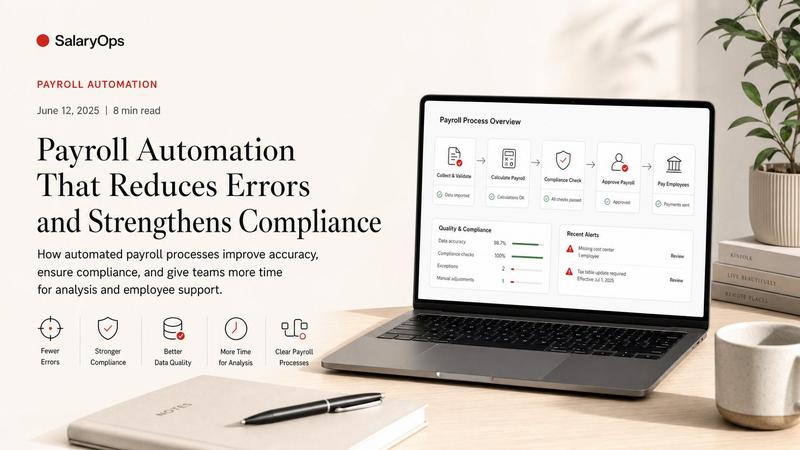
Payroll automation is one of those phrases that can mean anything from “the system calculates tax” to “nobody touches payroll ever again.” In real payroll life, those are not the same thing.
A practical definition is this:
Payroll automation is anything that removes recurring manual work from the payroll cycle without reducing control, documentation, or compliance.
So yes-calculations can be automated. Approvals can be automated. Filings can be automated. Payments can be automated. Reporting can be automated. Reconciliations can be partially automated.
But payroll is also full of exceptions, local rules, and “this employee is special” cases. Automation works best when it’s paired with controls that make the process harder to break.
A quick reality check on the trend
Automation is not slowing down. A few recent indicators:
- A 2024 SD Worx survey reported that 42% of UK employers use AI in payroll in some form, suggesting automation and AI-assisted workflows are already mainstream for many teams.
- Market forecasts continue to project strong growth in payroll software as automation and integration deepen (multiple analyses point to sustained multi-year growth).
- Industry commentary in 2025-2026 increasingly focuses on “payroll stacks,” governance, and auditability-because automation without traceability is just faster confusion.
Below is a grounded walkthrough of what parts of payroll can actually be automated, what usually should not be fully automated, and how to think about control at each step.
1) The payroll flow (so we’re talking about the same thing)
Most payroll cycles-regardless of country or system-follow the same operational structure:
- Collect and validate inputs (master data changes, time, absences, variable pay)
- Calculate pay
- Review and approve
- Pay employees and third parties
- File and remit taxes/social contributions
- Post to finance and reconcile
- Report, archive, and handle corrections
Automation can touch every step. The question is what you automate safely, and what you keep as a controlled human decision.
2) What payroll inputs can be automated (and where it often goes wrong)
If payroll automation fails, it’s usually not because the calculation engine is “bad.” It’s because the inputs are messy.
What can be automated well
- Importing master data changes from HR (new hires, terminations, job/comp changes, cost center changes)
- Importing time and attendance results (hours, overtime, shift premiums)
- Importing absence data (paid leave, unpaid leave, sickness, parental leave)
- Importing variable pay (commissions, bonuses, allowances) from source systems
- Standardizing recurring allowances/deductions using rules rather than manual entry
What must be controlled (even if automated)
- Mapping: Does “allowance type A” in HR mean the same pay code in payroll?
- Effective dates: Is the change meant for this payroll period or next?
- Eligibility rules: Who is entitled, and under what contract/union/country rules?
Practical automation pattern
Automate the import, but keep automated validation checks before the data reaches calculation. Examples:
- Missing bank account for a new hire
- Salary change without manager approval reference
- Overtime hours outside expected range for that employee group
- Cost center change without finance mapping
3) Payroll calculations: heavily automatable, but still not “set and forget”
This is the part everyone assumes is automated-and mostly, it is.
What can be automated well
- Gross-to-net calculations
- Tax withholding and social contributions (based on up-to-date rates/thresholds)
- Overtime, shift differentials, and premiums (when time codes and rules are consistent)
- Proration (start/end dates, unpaid leave)
- Standard benefit deductions
- Retro calculations (within the limits of the system and local requirements)
Where humans still matter
- One-off agreements and settlements (especially where wording and local practice matters)
- Complex retro scenarios (multiple changes across periods, cross-border moves, benefit eligibility changes)
- Local edge cases that are not edge cases (they happen every month)
A good rule of thumb
Automate calculations, but never automate “trust.” Trust comes from controls like:
- Variance checks vs last month
- Min/max thresholds per pay component
- Net pay sanity checks
- Exception reports for retro and manual entries
4) Approvals and workflow: very automatable (and often undervalued)
Many payroll teams still approve payroll through emails, Teams messages, or “I saw it and it looked fine.” That is not a control. That is memory.
What can be automated
- Approval routing (who approves what, by employee group/country/cost center)
- Cut-off enforcement (changes after the deadline are routed as next-cycle items)
- Audit trail (who approved, when, based on which report)
- Two-person rule for sensitive changes (bank account, salary, bonuses)
What should not be automated away
- The decision itself when it’s a policy exception
- Approval of high-risk items (large off-cycle payments, unusual retro, termination settlements)
5) Tax filing and statutory reporting: often automatable, but jurisdiction-dependent
This is one of the most valuable automations when it’s done properly-because compliance is where payroll risk gets expensive.
What can be automated
- Tax calculations and statutory deductions driven by system rules
- Generation of statutory reports and year-end forms
- E-filing where supported
- Remittance schedules and reminders
- Updates to statutory rates/thresholds (depending on vendor/system model)
What still needs attention
- Registration and account setup (you can’t automate what isn’t configured)
- Data quality checks before submission
- Reconciliation between filed amounts, paid amounts, and payroll ledger
- Handling notices, corrections, and amended returns
6) Payments: automatable, but it must be tightly controlled
Payments are operationally easy to automate-and operationally painful to fix when something goes wrong.
What can be automated
- Payment file creation (bank formats, ISO formats where applicable)
- Direct deposit execution through integrated payment rails (depending on provider)
- Scheduled payments for statutory bodies and benefit providers
- Off-cycle payment workflows (with pre-defined reasons and approvals)
Controls that matter
- Bank account change controls (two-person review, waiting periods, validation)
- Payment run reconciliation (who is paid, what is paid, and whether it matches the approved payroll)
- Separation of duties (the person who changes data should not be the only person who releases payments)
7) Reporting: automatable, and a good place to start small
Reporting is often the fastest “small automation” win because it reduces recurring manual work without changing core payroll logic.
What can be automated
- Scheduled payroll reports (variance, retro, new hires/terminations, overtime summaries)
- Labor cost reporting by cost center and country
- Compliance dashboards (late changes, missing data, approvals not completed)
- Employee self-service payslips and standard statements
A practical warning
A dashboard is not a control if nobody owns it. Automated reporting only helps when:
- Someone is responsible for reviewing it
- There’s a defined threshold for “what triggers investigation”
- The output is consistent month to month
8) Reconciliations: partially automatable (and worth it)
Reconciliation is where payroll meets finance, taxes, and reality. It’s also where “automation” often turns into “we have more data, but still reconcile in Excel.”
What can be automated
- Automated comparison between payroll results and GL posting outputs
- Automated reconciliation of tax liabilities vs remittances
- Matching benefit deductions vs benefit provider invoices
- Exception lists for out-of-balance items
What usually stays manual (but can be structured)
- Explaining variances (why it changed)
- Validating that the explanation is acceptable (policy/compliance)
- Correcting mapping issues and re-running postings
The goal is not to remove humans from reconciliation.
The goal is to remove hunting.
9) What payroll cannot realistically be fully automated
If someone promises “fully automated payroll,” they are either selling software or living in a country with one employee type, one contract, and no change.
Parts that typically require human judgment
- Policy exceptions and special agreements
- Termination settlements and sensitive cases
- Cross-border and multi-jurisdiction scenarios
- Ambiguous input data (missing context, conflicting sources)
- Responding to authority notices and audits
You can still automate around these cases:
- Build structured workflows
- Require mandatory documentation fields
- Route to the right reviewer
- Capture the decision trail
10) A simple way to think about payroll automation: automate tasks, not accountability
Here’s a practical “automation ladder” that tends to work in real payroll operations:
Level 1: Automate extraction
Imports from HR/time/benefits instead of manual re-entry.
Level 2: Automate validation
Rules that catch problems before calculation (missing data, outliers, cut-off violations).
Level 3: Automate calculation
Stable, rules-based calculations with minimal manual entries.
Level 4: Automate workflow
Approvals, audit trails, and segregation of duties built into the cycle.
Level 5: Automate outputs
Payment files, filings, postings, and scheduled reporting.
Level 6: Automate reconciliation signals
System-generated “what changed and why” views, plus exception-driven follow-up.
Notice what’s missing: “remove responsibility.” Payroll always needs an owner.
11) A basic orientation checklist: which parts are you actually automating?
If you want to quickly categorize what “payroll automation” means in your context, ask:
- Calculations: Are gross-to-net and standard deductions rules-based, or do you still key them?
- Approvals: Is approval a workflow with an audit trail, or a chat message?
- Tax filing: Are statutory reports generated and filed electronically, or prepared manually?
- Payments: Are payment files generated and reconciled automatically, or hand-built?
- Reporting: Are recurring reports scheduled and consistent, or rebuilt each month?
- Reconciliation: Do you reconcile via exception lists, or by searching through data until it matches?
Conclusion
Most of payroll can be automated in the sense that the system can calculate, route, produce files, and generate reporting. The parts that resist automation are usually the parts that involve human judgment, unclear inputs, and local complexity.
The practical goal is not “maximum automation.” It’s fewer recurring manual tasks, fewer repeat errors, and a payroll process that is easier to run and easier to control-month after month.
Structure your payroll process in 8 days.
A free 8-day email series for payroll specialists, managers and HR/finance teams. Practical examples on structure, controls and automation — no technical experience required.
- · one short email per day for 8 days
- · payroll workflow examples
- · control principles
- · n8n as part of the setup
- · free — unsubscribe anytime