
What Payroll Controls Should a Small Team Have? A Practical, Lightweight Setup That Actually Works
Learn how small teams can implement practical, lightweight payroll controls to prevent errors, ensure compliance, and maintain a robust audit trail. This guide covers approvals, segregation of duties, reconciliations, access controls, and documentation without
Payroll controls are one of those topics that get overcomplicated fast. Big-company frameworks, endless matrices, three layers of review… and then reality hits: you’re a small team, you’re busy, and payroll still has to run.
The good news is that “good control” doesn’t require a big team. It requires a few repeatable checks that target the real risks: unauthorized changes, incorrect payments, missed deductions, and errors that repeat because no one turned them into a fixed control.
If you’ve looked at public-sector checklists (for example, state auditor payroll questions), you’ll recognize the recurring themes: payments should reconcile to approved payroll, and differences should be investigated and documented. That’s not bureaucracy for its own sake. It’s a clear way of proving that payroll outputs match what was authorized.
Below is a practical set of payroll controls that a small team can run every pay cycle without building a “mini internal audit department.”
The principle to keep in mind: control before optimization. If you can’t control the basics, adding more automation or more systems mostly just moves errors around faster.
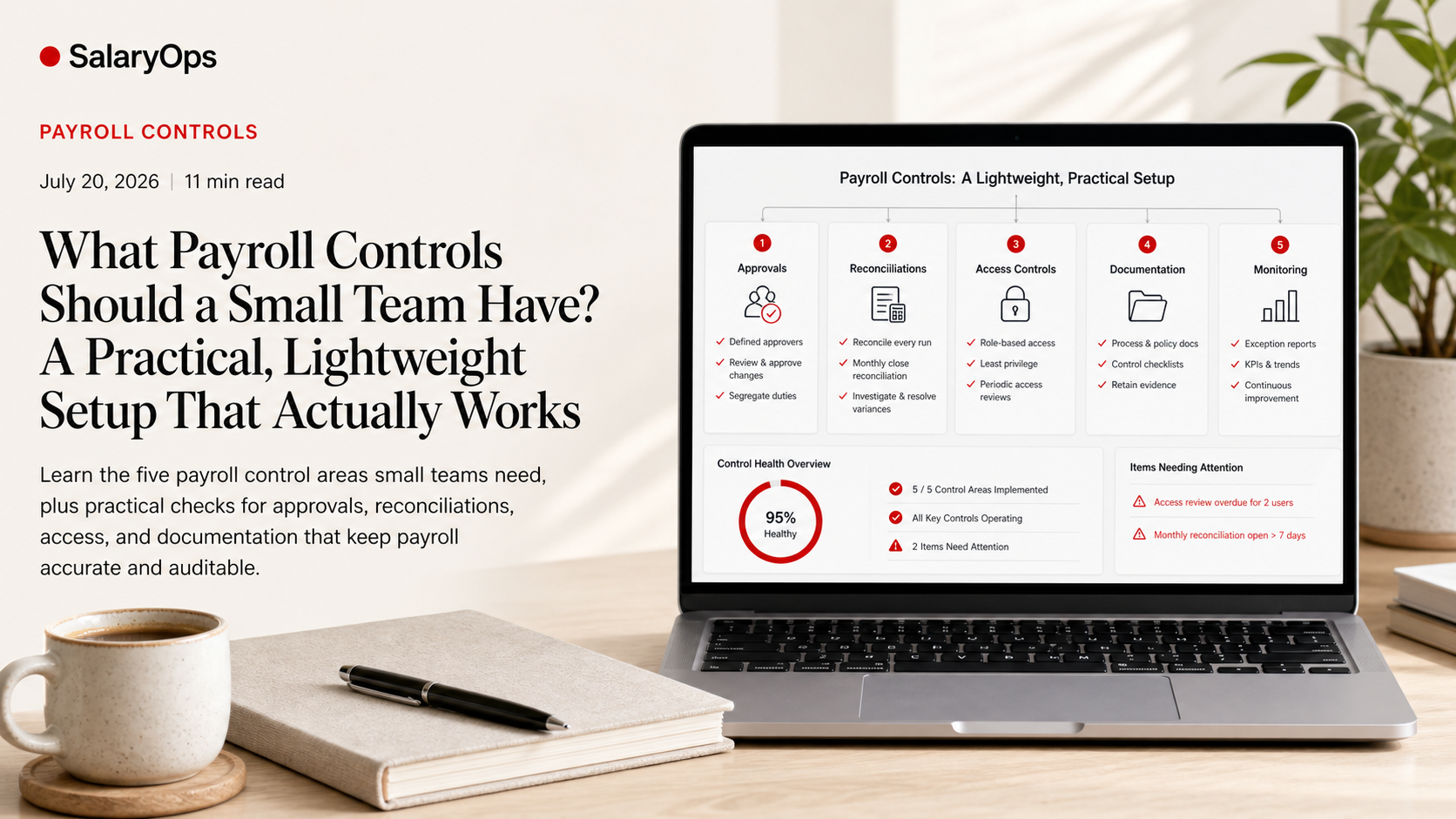
The 5 control areas that matter (and map to most audit checklists)
Most payroll control requirements—public sector or private—collapse into five areas:
- Approvals (authorization)
- Segregation of duties (or compensating controls when you can’t)
- Reconciliations (payroll-to-approval, payroll-to-ledger, payroll-to-bank)
- Access controls (least privilege, role-based permissions)
- Audit trail and documentation (who changed what, and why)
If your controls cover those five, you’re typically in a strong place.
Approvals - define what must be approved, by whom, and when
Approvals are your “permission structure.” Without them, everything becomes a judgment call, and judgment calls are not a control.
What should be approved in a small payroll process?
Focus approvals on the items that can change pay:
- New hires and terminations (start date, end date, eligibility)
- Pay rate or salary changes
- One-time payments (bonus, allowances, retro pay)
- Overtime and premium pay (especially if driven by manual adjustments)
- Changes to bank account details
- Changes to tax withholding or key payroll master data (where applicable)
- The payroll run itself (final review and “yes, pay this” sign-off)
Make approvals visible and retrievable
Auditors (and future-you) will ask: “Where is the evidence that this was approved?”
Practical options that don’t require fancy tooling:
- System workflow approvals (best option if you have it)
- A simple approval form attached to the change request
- A manager sign-off email stored in a consistent folder
- A ticketing system approval (if HR/payroll changes come in as tickets)
Key point: approvals must be traceable to the payroll output. If a bonus is approved, you should be able to tie that approval to a line item on the payroll register.
Segregation of duties - and what to do when you can’t fully separate roles
“Segregation of duties” sounds like something only large finance teams can do. But the principle is simple: no single person should be able to (1) create a change, (2) approve it, and (3) pay it, without anyone else noticing.
The ideal split (even in a small team)
If you have at least two people involved, aim for this:
- Person A: enters changes and prepares payroll
- Person B: approves the payroll run and reviews key exceptions
- Person C (often finance): releases payments / uploads bank file / reconciles bank
In reality, you might not have Person C. That’s fine. The important part is preventing “one person can do everything.”
Compensating controls for very small teams (1–2 people)
If one person must execute most steps, use compensating controls that are:
- Independent (reviewed by someone outside payroll where possible)
- Repeatable (a checklist, not “I’ll take a look when I have time”)
- Evidence-based (the review produces a saved report, sign-off, or log)
Examples that work well in practice:
- A manager (not the payroll processor) reviews and signs off the payroll register before payment
- Dual approval for bank file release or manual payments
- A periodic independent review of payroll master data changes (e.g., monthly)
- Random spot checks (e.g., pick 5 employees and verify rate, hours, bank, and net pay)
This is where small teams can be surprisingly strong: a consistent “four-eyes” check beats a complex framework nobody maintains.
Reconciliations - the control auditors ask about for a reason
Reconciliations are where you prove that:
- payroll matches what was approved
- payroll matches what was posted
- payroll matches what was paid
This is exactly the kind of language you’ll see in public-sector payroll checklists: do payroll payments reconcile to approved payroll, and are differences investigated?
Reconciliation #1 - “Approved payroll” to payroll register
This is the most basic and most important one.
What to do each pay cycle:
- Collect the approved inputs (approved timesheets, approved overtime, approved one-time payments, approved salary changes).
- Run payroll.
- Compare the payroll register to those approvals.
- Identify differences.
- Document why the difference exists, and whether it is acceptable.
What differences typically look like:
- Someone’s overtime differs from the approved sheet (manual adjustment, correction, or error)
- A new hire appears but the start paperwork was missing or late
- A terminated employee still gets paid (timing issue or master data issue)
- A one-time payment is missing or duplicated
The control is not “no differences ever.” The control is: differences are visible, explained, and signed off.
Reconciliation #2 - payroll register totals to the general ledger
At minimum, reconcile:
- Gross pay totals
- Employer taxes / social contributions
- Benefit deductions and employer benefit expense
- Net pay / cash requirement
The goal is to ensure payroll is posted correctly and consistently to the right accounts and cost centers.
Practical tip: keep a standard posting template. If you change the posting logic every month, you’ll spend every month “discovering” the same issues.
Reconciliation #3 - payroll to bank (or payment output)
Confirm that:
- The total net pay in the payroll register equals the bank file / payment total
- Manual payments are included and explained
- Reversals and recalls are tracked
- Any rejected payments are investigated and resolved
Even if you outsource bank file generation to a payroll provider, the responsibility to confirm what was paid still sits with the organization.
Access controls - keep permissions boring and minimal
Payroll is a high-impact system. A single permission can allow someone to change pay rate, bank account details, or tax settings.
The goal of access control is simple: people should only have the access they need to do their job, and nothing more.
Minimum practical access controls
- Role-based access (separate roles for data entry, approval, and payment release)
- Multi-factor authentication (MFA) where possible
- No shared accounts (shared accounts destroy audit trail)
- Immediate access removal for leavers
- Periodic access review (quarterly is a good small-team rhythm)
A small-team access review that takes 15 minutes
Once a quarter, export or print the user access list and check:
- Who has admin rights?
- Who can change payroll master data?
- Who can approve payroll?
- Who can create or release payments?
Then document the review with date, reviewer, changes made.
This tiny habit prevents long-term “permission creep,” which is one of the most common reasons audit trails become meaningless.
Audit trail and documentation - your future self will thank you
An audit trail is not a compliance trophy. It’s a practical way to answer questions quickly:
- Who changed the pay rate?
- When was it changed?
- What was it changed from/to?
- What approval supports it?
If your process can’t answer those questions without a detective story, it’s fragile.
What to document (without drowning in paperwork)
Document the decisions and the changes—not everything.
Good “small team” documentation includes:
- A change log for payroll master data (new hire, term, salary, bank changes)
- A payroll run checklist signed/dated each cycle
- A saved payroll register (final) and key exception reports
- Reconciliation files (register vs approvals, register vs GL, register vs bank)
- A short issue log: what went wrong, how it was fixed, and what control prevents repeat
That last point matters more than most teams realize: an error log should not become an archive. If the same error happens twice, the better question is not “who messed up?” but “why was the process able to produce this again?”
A lightweight payroll control checklist (per pay cycle)
Use this as a practical rhythm. It’s intentionally short.
Before payroll is run
- Approved changes received and filed
- New hires/terms
- Pay changes
- One-time payments
- Approved timesheets/overtime
- Master data change log updated
- Who requested
- Who entered
- Who approved
During payroll processing
- Exception review
- New hires
- Terminations paid
- Negative net pay / unusual net pay
- Large variances from prior period
- Manual checks / off-cycle payments
- Payroll run approval (“yes, pay this”)
- Payroll register reviewed and signed off by someone other than the preparer (or compensating review documented)
After payroll is paid
- Reconcile payroll payments to approved payroll inputs
- Differences listed
- Differences investigated
- Resolution documented and signed off
- Reconcile payroll totals to general ledger posting
- Differences investigated
- Corrections posted
- Reconcile payroll cash requirement to bank/payment output
- Rejected payments tracked and resolved
- File retention
- Payroll register + approvals + reconciliations saved in a consistent location
Common small-team failure points (and simple fixes)
“My memory is the control”
If payroll only runs correctly because one person remembers the workaround, it is not controlled. The fix is not a 40-page procedure. The fix is a checklist plus a saved report that someone else can review.
Approvals exist, but they don’t connect to payroll output
Approvals that can’t be tied to a payroll register line are functionally useless in audits and investigations.
Fix: use a consistent reference (employee ID, pay period, pay code) and store approvals with the payroll period package.
Segregation of duties is “impossible,” so it’s ignored
Small teams rarely achieve perfect segregation. But ignoring the principle entirely is where risk spikes.
Fix: a compensating control is still a control—if it is independent, documented, and repeatable.
Reconciliations are done, but differences aren’t investigated
This is exactly what auditor checklists are trying to catch. A reconciliation that flags issues but doesn’t resolve them is an alarm you decided to live with.
Fix: maintain a short differences log with owner, explanation, and closure date.
Conclusion: Control that fits reality is control you will actually run
A small team doesn’t need “enterprise-grade payroll governance.” It needs a handful of controls that show, every pay cycle, that payroll was authorized, reviewed, paid correctly, and reconciled—plus a habit of investigating differences instead of accepting them as normal.
When approvals are clear, duties are separated (or compensated), reconciliations are routine, access is tight, and audit trails are intact, payroll becomes calmer. Not because it’s perfect, but because it’s controllable—and that is what makes payroll operations hold up in real life.
Structure your payroll process in 8 days.
A free 8-day email series for payroll specialists, managers and HR/finance teams. Practical examples on structure, controls and automation — no technical experience required.
- · one short email per day for 8 days
- · payroll workflow examples
- · control principles
- · n8n as part of the setup
- · free — unsubscribe anytime