
What Reports Should You Compare During Payroll Reconciliation? A Practical Checklist
Master payroll reconciliation with this practical checklist. Learn which reports to compare, from time records and HR changes to bank statements, GL postings, and tax reports, ensuring accuracy and compliance in every payroll cycle.
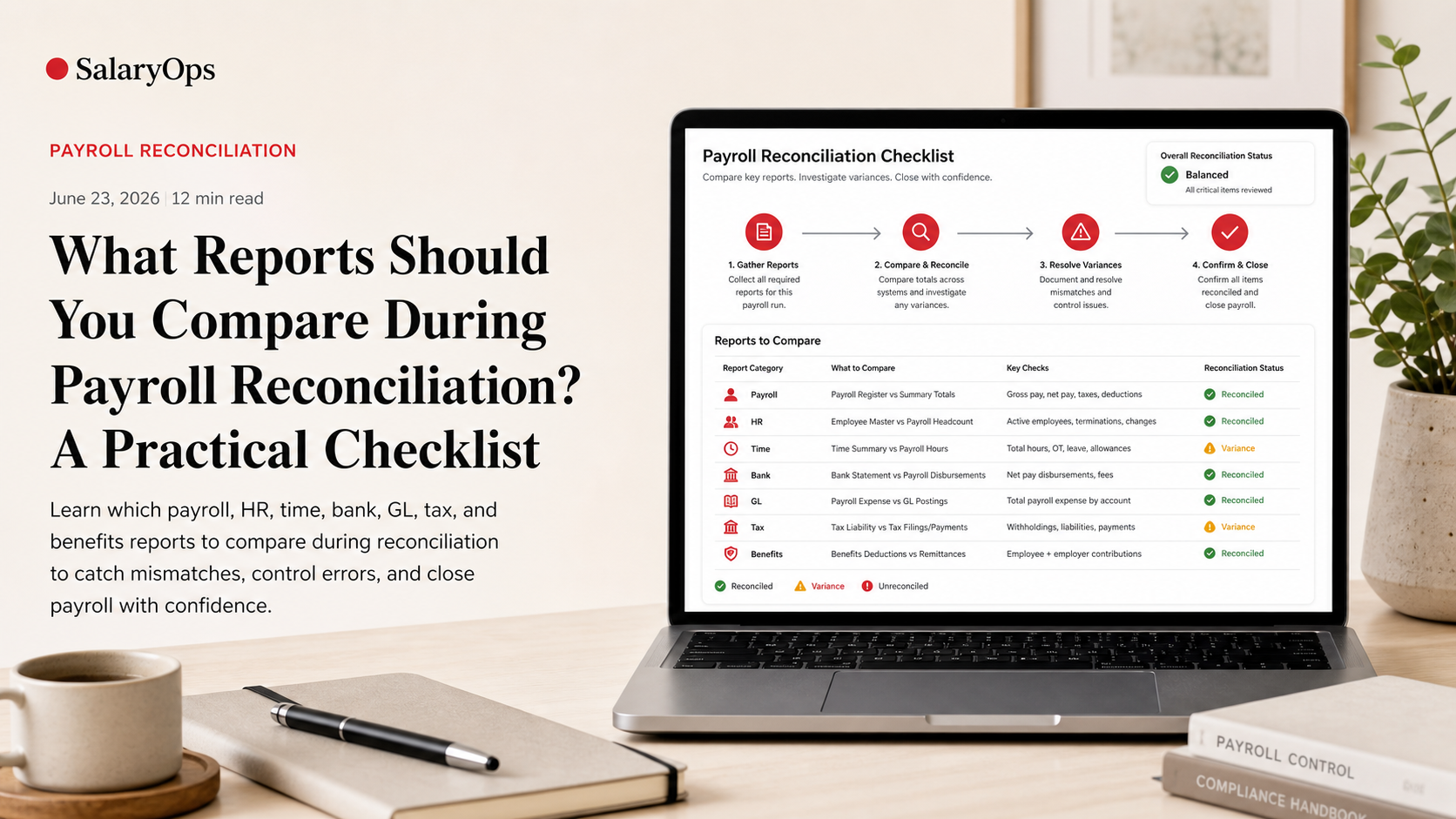
What Reports Should You Compare During Payroll Reconciliation? A Practical Checklist
Payroll reconciliation is one of those tasks that sounds “accounting-ish” until you’ve lived through a month-end close with three retro changes, one terminated employee who still got paid, and a benefits file that didn’t update.
The point of reconciliation is simple: prove that the numbers in payroll match the numbers in the systems that feed payroll (HR and time) and the systems that payroll feeds (bank and general ledger), and that your statutory reporting (tax/benefits) agrees with what actually happened.
Below is a practical, payroll-first checklist of the reports worth comparing every cycle. It’s tool-agnostic on purpose—because the controls matter more than the brand name on the export.
The “four-way match” that keeps payroll honest
If you only remember one model, use this:
- Inputs: HR changes + time records
- Payroll engine output: payroll register
- Money movement: bank/ACH file + bank statement
- Accounting + compliance: GL posting + tax/benefits reports
Most payroll reconciliation issues are just mismatches between these four.
Payroll register (the anchor report)
Pull these versions
- Detailed payroll register (employee-level, all earning/deduction/tax lines)
- Summary payroll register (totals by earning type, deduction, tax, employer cost)
- YTD register (to catch cumulative issues like caps and limits)
Compare the payroll register to…
- Time records (hours and pay codes)
- HR changes (rates, status, cost center)
- Bank file (net pay totals)
- GL posting (expense and liability totals)
- Tax and benefits reports (withholding and deduction totals)
What you’re looking for
- Unexpected gross changes (new allowances, missing overtime, retro surprises)
- Deductions that stop/start incorrectly
- Tax caps not stopping when they should (or stopping too early)
Note (US example): The Social Security wage base changes over time (e.g., $168,600 for 2024 and $176,100 for 2025 per SSA guidance), so YTD checks help you spot cap-related issues early in the year.
Timekeeping and time records (your reality check)
Reports to pull
- Timekeeping export for the pay period (hours by day or by pay code)
- Exception reports (missed punches, unapproved time, edited time, overtime exceptions)
- PTO/leave report (taken hours and, ideally, balance changes)
Compare against the payroll register
Check at two levels:
- Employee level
- Regular hours, overtime hours, shift differentials
- PTO/leave paid vs. recorded
- Unpaid absences (LWOP) showing correctly
- Pay code level
- Total hours per pay code in time system vs. payroll
- New or rarely used pay codes (common source of mapping mistakes)
Common mismatches (and why they happen)
- Late approvals: time posted after payroll cut-off
- Mapping problems: “OT 1.5” in time system mapped to wrong earning code in payroll
- Manual fixes: someone “just keyed it” in payroll instead of correcting time
HR changes and master data (what should have changed)
Reports to pull
- New hires / rehires
- Terminations (including termination date and final pay date)
- Compensation changes (rates, salary, allowances)
- Job/grade changes (that affect premiums, allowances, eligibility)
- Cost center / department / location changes (for GL costing)
- Bank account changes (direct deposit changes)
- Benefits eligibility/enrollment changes (life event enrollments, plan changes)
Compare against the payroll register
- New hires paid? (and paid under the right rates and tax setup)
- Terminations not paid again? (especially if there are multiple pay groups)
- Rate changes applied with the correct effective date?
- Cost center changes reflected in costing?
A control that saves time
Reconcile “effective-dated changes during the pay period” separately. Most payroll errors are not random—they’re dated.
Bank/ACH file and bank statement (did the money match the payroll?)
Reports/files to pull
- ACH/NACHA bank file (or payment instruction file)
- Payroll direct deposit report (net pay by employee)
- Paycheck/cheque register if applicable
- Bank statement activity for the payroll account (including reversals)
Compare these totals
- Total net pay in payroll register vs. total credits in bank file
- Employer debits (if applicable) vs. what actually cleared
- Voids/reversals: payroll void report vs. bank returns
What you’re looking for
- Employees paid twice (duplicate entries in bank file)
- Employees not paid (missing entry)
- Rejected deposits or returns (often due to account changes)
Operational note: A prenote (zero-dollar ACH test) is commonly used to validate account details before live payments. It reduces avoidable returns, but it’s not a fraud control on its own—dual approval and change logs matter just as much.
General Ledger posting and payroll accounting (did the books get the same story?)
Reports to pull
- Payroll journal entry / GL interface report (what payroll posted)
- GL detail by account for payroll-related accounts (wage expense, taxes, benefits, clearing)
- Payroll clearing account activity (if used)
- Costing report (by cost center/project/location)
Compare at three levels
- Total level
- Gross wages expense
- Employer taxes
- Employer benefits
- Total deductions and liabilities
- Account mapping level
- Are taxes going to tax liability accounts (not wage expense)?
- Are benefits deductions hitting the correct liability accounts?
- Are employer contributions booked separately from employee deductions?
- Costing level
- Do departments/cost centers match HR and time?
- Are allocations stable period over period (no “mystery shifts”)?
The payroll clearing account litmus test
If your clearing account doesn’t return to (near) zero after funding and posting, you don’t have a reconciliation problem—you have an “unknown item” problem.
Tax reports (quarterly and per-run sanity checks)
Reports to pull
- Per-run tax summary (withholding and employer tax amounts)
- Deposit confirmation reports (EFTPS or local equivalents)
- Quarterly returns summaries (e.g., US Form 941 totals and liability schedule alignment)
- Annual totals report (W-2/Wage statement reconciliation report)
Compare the right things
- Payroll register tax totals vs. tax filing totals (by jurisdiction)
- Tax liability vs. deposits made (timing differences documented)
- YTD wages and taxes vs. quarterly cumulative totals
What you’re looking for
- Tax jurisdiction errors (employee assigned to wrong state/local)
- Large adjustments without documentation
- Deposit timing mismatches (especially if funding and deposits run on different schedules)
If you find errors after filing, the formal fix is typically an adjusted return (for example, Form 941-X in the US for previously filed quarters). The operational takeaway: reconcile early enough that you’re correcting payroll, not just correcting forms.
Benefits deductions and employer contributions (where “it should match” often doesn’t)
Reports to pull
- Payroll deduction register (by plan/deduction code)
- Benefits enrollment changes (effective dates matter)
- Carrier billing or benefits provider invoice
- Retirement file/report (employee deferrals + employer match)
Compare across three sources
- Payroll vs. enrollment
- Who is enrolled vs. who is being deducted
- Effective date alignment (mid-period changes are common)
- Payroll vs. carrier billing
- Deductions and employer premiums vs. carrier invoice
- Coverage tiers and rate changes
- Payroll vs. remittance
- What you withheld vs. what you sent (and when)
What you’re looking for
- Deductions continuing after termination
- Missed first deductions for new enrollments
- Incorrect pre-tax/post-tax treatment (can cascade into tax reporting)
Garnishments and other third-party deductions (small lines, big consequences)
Reports to pull
- Garnishment register (by employee and case)
- Remittance report / payment confirmations
- New orders/changes report (effective dates, limits)
Compare
- Amount withheld vs. amount remitted
- Start/stop dates vs. payroll periods
- Priority order (when multiple orders exist)
What you’re looking for
- Missing remittances
- Withholding outside allowed limits
- Orders not stopping when satisfied
A simple reconciliation cadence that works in real life
Every payroll run (fast, repeatable)
- Payroll register vs. time records (hours and pay codes)
- Payroll register vs. HR changes (effective-dated list)
- Payroll register net pay vs. bank file total
- “Top 10 variances” check: biggest gross changes, biggest net changes, new deductions
Monthly close (finance alignment)
- Payroll journal vs. GL posting confirmation
- Payroll-related balance sheet accounts (taxes, benefits, clearing) reconciled to sub-ledgers
Quarterly (tax confidence)
- Payroll tax summary vs. quarterly returns and deposit confirmations
Year-end (cumulative sanity)
- YTD payroll register vs. annual tax forms and benefits totals
- Wage base and cap checks (where applicable)
The reconciliation checklist (copy/paste)
Use this as your pull list:
Payroll output
- Detailed payroll register (current period)
- Payroll summary report (current period)
- YTD payroll register
- Void/reversal report
Inputs
- Timekeeping export (hours by employee and pay code)
- Time exceptions report (edits, missed punches, unapproved time)
- PTO/leave taken report and (if available) accrual/balance report
- HR change report: hires, terms, pay changes, job changes, cost center/location changes
- Direct deposit change report
- Benefits enrollment/eligibility changes
Money movement
- ACH/NACHA file totals and direct deposit report
- Payroll bank account statement activity (cleared amounts + returns)
Accounting
- Payroll journal entry / GL interface report
- GL detail for payroll expense and liability accounts
- Payroll clearing account reconciliation (if used)
- Costing/allocation report by cost center/project
Compliance and third parties
- Tax summary report by jurisdiction
- Deposit confirmations (federal/state/local)
- Quarterly return totals and liability schedules (where applicable)
- Benefits deduction register by plan
- Carrier invoice / provider billing report
- Retirement contribution file/report
- Garnishment register and remittance confirmations
Conclusion
Payroll reconciliation is less about “checking everything” and more about checking the few comparisons that actually expose risk: inputs to register, register to cash, register to GL, and register to statutory and third-party reporting. Once those matches are routine, payroll stops being a monthly detective story and starts being a controlled process that holds up—even when reality shows up with retro changes and odd exceptions.
Structure your payroll process in 8 days.
A free 8-day email series for payroll specialists, managers and HR/finance teams. Practical examples on structure, controls and automation — no technical experience required.
- · one short email per day for 8 days
- · payroll workflow examples
- · control principles
- · n8n as part of the setup
- · free — unsubscribe anytime