
Will Payroll Automation Reduce Manual Errors? Yes, But Only If You Automate With Control
Payroll automation reduces manual errors significantly, but only when paired with proper controls, validation rules, and human oversight. Automation without governance just scales mistakes faster.
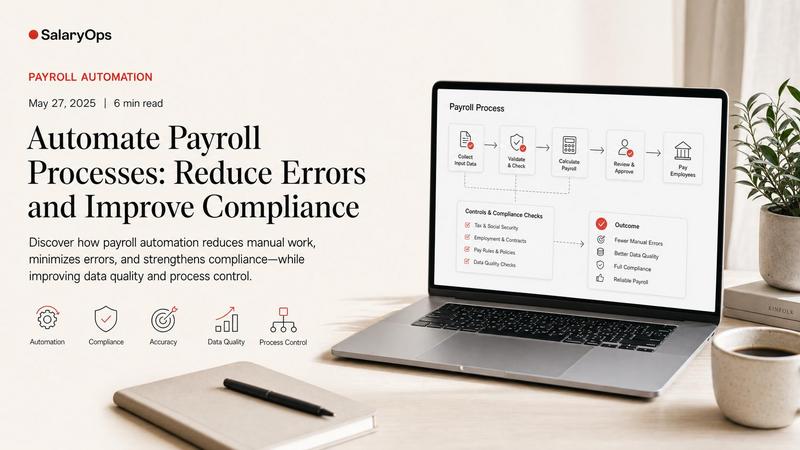
Payroll errors are rarely “just admin.” They are wrong hours, wrong deductions, wrong tax, and the slow, morale-draining rework that follows. And because payroll is a chain of handoffs-HR data, time data, pay rules, benefits, tax, approvals-manual touchpoints multiply the risk.
So will payroll automation reduce manual errors?
In practice: yes, it can significantly reduce the most common manual mistakes. But it does not magically create accuracy. Automation mainly removes repeated hand-typing and spreadsheet copying. If the underlying data, rules, or integrations are weak, automation can also move errors around faster.
This article breaks down what automation actually fixes, what it doesn’t, and how to make sure “automated” doesn’t become “uncontrolled.”
Why manual payroll processes create so many errors
Most payroll errors are not caused by a single big failure. They’re caused by small, repeated moments where humans are asked to be a system:
- Copying hours from one place to another
- Re-keying employee master data changes (bank, address, tax status)
- Applying deductions based on emails or tickets
- Updating pay components from spreadsheets
- Remembering country- or union-specific exceptions
Even in general business data processing, commonly cited manual data-entry error rates sit in the 1%-4% range for structured fields (and often worse when complexity and time pressure increase). In payroll, 1% can be the difference between “quiet month” and “why are we doing ten off-cycle payments?” (Source: Lido’s overview of manual data-entry error rates)
Payroll also has a unique problem: errors don’t stay local.
A wrong hour can become:
- Wrong gross pay
- Wrong pension/benefit basis
- Wrong tax withholding
- Wrong employer costs
- Wrong reporting
And then you have to fix it in multiple places.
What payroll automation reduces (the “good” kind of automation)
Automation is at its best when it removes repetitive manual handling and adds validation at the moment data enters the process.
Here are the error types that typically drop first when automation is implemented well.
1) Wrong hours and missing time entries
The classic: hours are approved in one tool, then re-entered (or pasted) into payroll. Every manual transfer is another opportunity for:
- A decimal mistake (7,5 vs 7.5)
- A missing line
- A swapped cost center
- Overtime mis-coded as regular time
Automating the time-to-payroll flow reduces the need for re-keying and improves consistency. Time and attendance research and benchmarking repeatedly highlights that manual timesheets drive significant error cost and downstream corrections, and that connecting time capture to payroll is one of the most direct ways to reduce those issues. (Source: EasyClocking time & attendance benchmarks)
What “good” looks like operationally:
- Time is transferred automatically after approval
- Exceptions (unapproved time, negative balances, missing cost center) block transfer
- Payroll receives an exception list, not a pile of raw edits
2) Duplicate entries and spreadsheet copy/paste errors
Spreadsheets are not evil. But they become risky when they are used as a transport layer.
If you’re copying:
- allowance changes
- deductions
- bonus lists
- retro adjustments
…then you’re also copying the risk that rows shift, filters hide items, or someone pastes values into the wrong pay code.
Automation helps by:
- Loading files via controlled imports with format checks
- Using templates that validate pay codes and employee IDs
- Logging every import and change (audit trail)
3) Basic tax and reporting mistakes caused by outdated logic
Inaccurate tax withholding often isn’t a “calculation problem.” It’s a data and update problem:
- an employee’s tax status didn’t reach payroll
- a table update wasn’t applied
- a change was applied late
Authorities are not sympathetic to “the spreadsheet said so.” Even basic guidance around correct wage and tax reporting underlines that the employer is responsible for accurate, timely forms and filings (US example: IRS W-2/W-3 instructions).
Automation helps when it:
- centralizes rule updates (tables, thresholds)
- makes effective-dated changes explicit
- reduces manual “workarounds” to handle special cases
4) Rework caused by inconsistent data across systems
Many payroll “errors” are really mismatches:
- HR says the employee is in location A; time system says location B
- HR says 80% FTE; payroll uses last month’s FTE
- Finance cost center differs from HR cost center
Automation doesn’t solve mismatched definitions by itself. But it can reduce rework if it includes automated reconciliation-meaning the system flags mismatches early instead of letting them surface in payroll calculations.
This is a consistent theme in broader payroll research: organizations see value when automation improves data flow reliability and reduces manual reconciliation work. (Source: ADP “The potential of payroll in 2024” report)
What payroll automation does NOT automatically reduce
This is where the marketing slides get dangerous.
Automation removes manual steps. It does not remove complexity.
1) Configuration errors
If your overtime rule is configured wrong, automation will calculate the wrong overtime perfectly-every time.
The same applies to:
- union rules
- pension bases
- benefit eligibility
- retro logic
- absence accruals
Automation can reduce manual mistakes, but it increases the importance of robust configuration governance:
- version control for rule changes
- documented test cases
- peer review of configuration
2) Bad master data
Automation cannot “clean” bad data. It can only process it.
If your payroll still depends on:
- free-text pay codes
- inconsistent job titles used as pay logic
- missing hire/termination dates
- unclear employment types
…then automation will amplify confusion unless you add validation.
A useful mental model:
Garbage in → faster garbage out.
3) Exceptions and edge cases (which aren’t edge cases)
In many payroll teams, exceptions are the normal workload:
- late hires
- terminations mid-period
- special bonus arrangements
- secondments
- parental leave rules
- cross-border taxation
Automation can help with exception handling, but only if you explicitly design for it:
- workflows for approvals
- documented exception categories
- clear ownership for “who fixes what”
4) Control failures
When people say “automation,” they often mean “we don’t have to look at it anymore.”
That is not automation. That is hope.
The operational truth is simple:
Automation without control simply moves errors around faster.
If a manual process forces you to review a spreadsheet, you at least touch the numbers. If you automate that step without replacing it with a control, you might not notice a mismatch until an employee complains.
How to make automation actually reduce errors: controls before speed
If error reduction is your emotional driver (and it usually is), the winning approach is not “automate everything.” It is:
- Reduce touchpoints
- Add validation where data enters
- Add controls where risk is highest
Here’s a practical control-first framework.
Step 1: Map where humans currently act as integrations
List every place where someone:
- retypes data
- copies/pastes
- manually calculates
- “fixes” something between systems
These are your primary error generators.
Step 2: Classify errors into three buckets
Bucket A: Data-entry errors
- Wrong hours keyed
- Wrong deduction amount typed
- Wrong employee selected
Bucket B: Data-coherence errors
- HR/time/payroll disagree
- Effective dates don’t align
Bucket C: Rule/configuration errors
- Pay rule wrong
- Tax/benefit logic wrong
Automation is most effective on Bucket A and parts of Bucket B. Bucket C needs governance and testing.
Step 3: Start with small, high-frequency automations
The best automation candidates are boring:
- automatically load approved time
- automatically validate new hires for mandatory fields
- automatically compare payroll input vs last period (variance control)
- automatically reconcile headcount and FTE between HR and payroll
Small automations are easier to test, easier to explain, and easier to trust.
Step 4: Replace “manual checking” with repeatable controls
A control should not depend on memory.
Examples of controls that reduce errors in automated payroll operations:
- Input completeness checks (missing time, missing bank, missing tax status)
- Duplicate detection (same allowance loaded twice)
- Threshold checks (deduction exceeds expected limits)
- Variance checks (net pay change > X% without a valid reason)
- Reconciliation checks (HR headcount vs payroll headcount; cost centers aligned)
Step 5: Measure error reduction the way payroll feels it
Track what actually creates pain:
- number of corrections per payroll
- number of off-cycle payments
- number of tickets related to wrong pay
- time spent on rework
- number of manual adjustments (and why)
Global payroll research continues to highlight that payroll mistakes affect employee trust and create operational drag-meaning the benefit of automation is not just cost, but calmer operations. (Source: Remote’s Global Payroll Report on the impact of payroll mistakes)
A practical example: overtime errors
Overtime is a perfect example because it combines all three risk buckets.
- Data-entry risk: hours and overtime codes entered manually
- Data-coherence risk: time system uses one definition; payroll uses another
- Rule risk: overtime premium calculation or eligibility configured wrong
Automation can reduce the first two-if the source data is validated and transferred after approval.
But if the pay rule is wrong, automation will replicate the wrong premium across the workforce. That’s why overtime automation should always include:
- documented overtime definitions (what counts, what doesn’t)
- test cases for typical and “messy” scenarios
- variance checks on overtime amounts period to period
Conclusion: automation reduces manual errors-when it is designed to be controllable
Payroll automation is very good at removing the most avoidable mistakes: re-keying hours, copy/paste mishaps, duplicated entries, and inconsistent handoffs. In other words, it reduces the errors that come from humans doing repetitive system work.
But automation does not automatically create accuracy. It shifts the work from manual entry to system design, data quality, configuration governance, and controls.
The most reliable payroll teams don’t chase “full automation.” They chase fewer touchpoints, clearer data flows, and controls that catch problems early-so the payroll process becomes harder to break, even when reality hits.
EXCERPT
Payroll automation can significantly reduce manual errors by eliminating repetitive tasks and adding validation. However, it doesn't magically create accuracy. Automation without proper controls on data, configuration, and processes can amplify errors rather than fix them.Structure your payroll process in 8 days.
A free 8-day email series for payroll specialists, managers and HR/finance teams. Practical examples on structure, controls and automation — no technical experience required.
- · one short email per day for 8 days
- · payroll workflow examples
- · control principles
- · n8n as part of the setup
- · free — unsubscribe anytime